simplifying the tile geometry in fishy facts
Recently, I've completely reworked the game flow for fishy facts to improve the new player experience and simplified the code that makes it work. It made me want to simplify and improve the performance of the puzzle solver as well, but in doing that I've had to touch many parts of the code.
the problem
Several levels deep into the yak-shaving process of "Oh, I should simplify this first, to make the previous step easier...", I ended up getting a bit stuck. You see, right now I build each tile by picking one of these 18 pieces for each of the 4 sides:

Well, actually, there's not only 18 pieces. Each piece is a special custom mesh with grooves cut into them for the paths and features. It just so happens that a feature is the colored dot in the center of a tile, and each color has a different shape to help colorblind players distinguish what color it is. So, for each piece that has a feature, there's actually a 8 different versions for the colors white, red, blue, green, cyan, magenta, yellow, and black. Unfortunately, this creates a combinatorial explosion -- bringing the total count of pieces to 88, if I counted right.
The large number of variations makes generating
the meshes for the tiles kind of a pain, but that's
something that constructive solid geometry
techniques and a nested for loop can
easily deal with. The problem is that the code for
deciding which of the pieces to use is rather
complicated.
This is especially true when it comes to coloring the path. A piece could have up to three different paths on them that might all have a different color. In order for me to color in a path, I have to know which pieces are involved and make some kind of lookup function to know which material slot on the piece to set the color on.
key insight
The key insight I had last night is that there are a few more features in the game that are placed in the center of a tile -- the mirror, light emitter, and light receiver. However, for these, I don't cut more grooves into the piece and create more variations. Instead, I just slap another mesh on top of the existing mesh.
I realized that this is a lot easier to deal with, in the same way i like my favorite pure-functional-style functions, because it requires less context in order to work. In order to place one of the light-related features, I don't need to know about literally everything else going on the tile, I only need to know if the feature is there or not.
This helped me realize that the code for deciding what piece to use is complicated because of the high level of context required. Like, take the tile in row 4, column 4 from the earlier diagram. In order to place this piece, I need to know that:
- There is a path on the adjacent left and right pieces that don't connect to the feature, and that we're on the side that this path avoids the feature on.
- There's another path coming in from the top that also doesn't connect to the feature that connects to the bottom.
- We know, somehow, that for this piece that the top path is being routed under the feature instead of around it like the path connecting from left to right.
- Based on the color, I need to lookup one of 8 different mesh variations.
solution
To simplify my tile mesh code, I can reduce the amount of context required. Instead of baking the paths directly into the tiles, and later reverse-engineering my way to something that looks like a whole path by placing pieces just right, I could just use meshes representing the whole path on top of the tile. This is what the path meshes would look like:
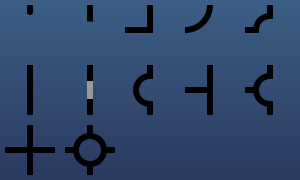
So instead of needing 88 meshes to draw a tile (plus the 3 light features), I would only need 24:
- 1 "base" tile mesh
- 12 path meshes
- 8 color features
- 3 light features
And I would no longer have to write a function that inspects the state of the tile from the perspective of a piece and what pieces are adjacent to it. Instead, I can operate from the perspective of the tile and combine the appropriate meshes based on its entire state.
And there's no longer a combinatorial explosion happening with the number of mesh variations i need.
And if I want to color a path, I just... set the color of the path mesh that represents that path, instead of needing to inspect the material slots on each piece and looking up which index belongs to the path I want to set the color for.
I'm pretty sure this solution works, but I haven't done it yet because I got so excited about it that I infodumped a draft of this in Discord before realizing I could just make it into a blog post. I'm really excited to try this new approach!